The mileage you drive to and from business-related appointments (i.e. – Auditions, Interviews, Callbacks, Classes, etc.) may be tax deductible! PerformerTrack can automatically calculate what your mileage is worth! In order to do this you must load up key mileage information.
In the United States there is a Cost Per Mile deduction allowed for the mileage you incur for not only Business Miles but for Medical, Moving & Charity Miles as well.
Since we have users all over the world we can't stick everyone with the United States Mileage Rates. So, if you live in the U.S., you must tell PerformerTrack how much Mileage is worth. PerformerTrack will then be able to calculate your Mileage correctly when you add Mileage as an expense in PerformerTrack's Expenses section.

|
_______________________________________________________________________
To update the Cost Per Mile/Kilometer Preferences simply do the following:
Go to the Top Toolbar and select My Account > Preferences > Mileage Rates
-or-
Click the Mileage Rates Tab located on the right-side of the Log
to open the Cost Per Mile/Kilometer Preferences screen.


Cost Per Mile/Kilometer Preferences Screen
|
INSTRUCTIONS |
|
Click on the “Add New Mi/KM Rates” button. |
|
Enter the correct Mileage Rate information. To enter the Start Date and End Date easily, you can click on the Calendar Icon next to each of the field boxes to launch the pop-up Calendar Picker. This will make sure you enter the dates in the proper date format (MM/DD/YYYY) |


|
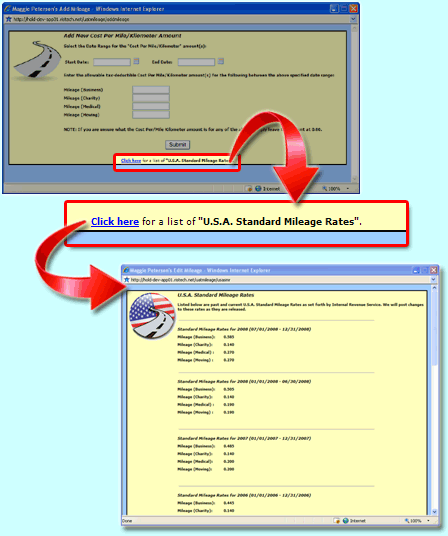
|
|
Click the "Submit" button. You will now see the Mileage Rates for the date range you just entered! |
|
Repeat Steps 1 through 3 until all date ranges you wish to enter are completed. |
That's it!
See Related Content:
"Does PerformerTrack Update The Changing U.S. Mileage Rates For Me?"
0 Comments